


WHAT IS TWITTER..?
Twitter is a social networking service and micro blogging where people can easily share about her or his and also send message to peoples and there fans and marketer for there product up to 140 characters, known as "tweets". Twitter was created in March 2006 by Jack Dorsey and launched July 2006. Twitter service rapidly gained worldwide popularity, with over 140 million active users as of 2012, generating over 340 millions tweets daily and handling over 1.6 billion search queries per day. The people who are not register on twitter can also show tweets but registered users can post tweets as well as read. It has been described as the SMS of the Internet.
SIGN UP WITH TWITTER:
Dear users first of all go to twitter.com after open that you will see following page... In following page you see the the form where New to Twitter? Sign up with twitter written I also mention this on red line you can see it ... So write your full name and email address after choose your new password or also can choose email password and click on sign up twitter button. After the twitter send to email in your mail Id check your inbox and verify that account and use twitter freely read messages and enjoying it....
SIGN UP WITH TWITTER:
Dear users first of all go to twitter.com after open that you will see following page... In following page you see the the form where New to Twitter? Sign up with twitter written I also mention this on red line you can see it ... So write your full name and email address after choose your new password or also can choose email password and click on sign up twitter button. After the twitter send to email in your mail Id check your inbox and verify that account and use twitter freely read messages and enjoying it....

Now after reading the above article you will not search "What is twitter".
POST A TWEET ON TWITTER:
Dear User open your twitter account and see the following picture where I mention the button with arrow. So click on this

Dear User open your twitter account and see the following picture where I mention the button with arrow. So click on this
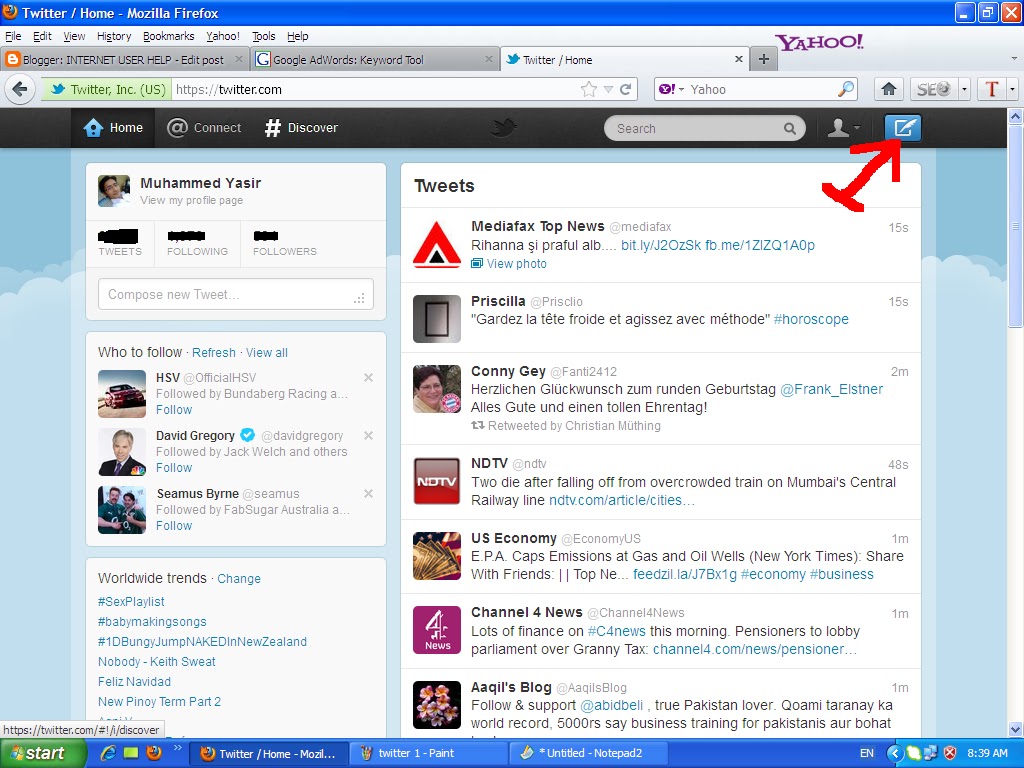
After click on tweet button you will see that page. So write you message or link who you share or tweet to your followers, fans or friends... And share it or tweet it... See the following pic..

When friends you click on tweet button your tweet will automatically publish on twitter and your followers and fans can read it.... Check this tweet on following picture....

I hope you will enjoyed it So, keep visit the blog and get free extra knowledge....

I hope you will enjoyed it So, keep visit the blog and get free extra knowledge....


