This is default featured slide 1 title

Go to Blogger edit html and find these sentences.Now replace these sentences with your own descriptions.This theme is Bloggerized by Lasantha Bandara - Premiumbloggertemplates.com.

This is default featured slide 2 title

Go to Blogger edit html and find these sentences.Now replace these sentences with your own descriptions.This theme is Bloggerized by Lasantha Bandara - Premiumbloggertemplates.com.

This is default featured slide 3 title

Go to Blogger edit html and find these sentences.Now replace these sentences with your own descriptions.This theme is Bloggerized by Lasantha Bandara - Premiumbloggertemplates.com.

This is default featured slide 4 title

Go to Blogger edit html and find these sentences.Now replace these sentences with your own descriptions.This theme is Bloggerized by Lasantha Bandara - Premiumbloggertemplates.com.

This is default featured slide 5 title

Go to Blogger edit html and find these sentences.Now replace these sentences with your own descriptions.This theme is Bloggerized by Lasantha Bandara - Premiumbloggertemplates.com.

Saturday, 21 July 2012

GAME COPY WIZARD:

GAME COPY WIZARD
GAME COPY WIZARD

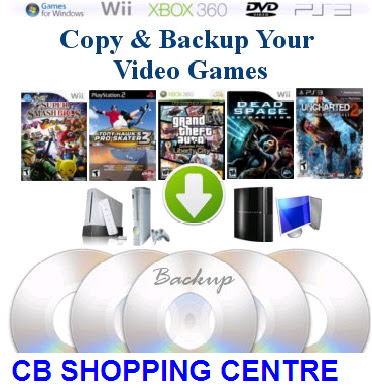
Game Copy Wizard is a very easier and better way for you to completely backup any Video Games as you like. Completely unlike anything our competitors are offering, it allows you to make quality backups of your games using a CD or DVD burner.

Have you ever been bothered that you cannot copy or backup video games ? You are in the right place! Yes friends you are in right place... From now on you can copy your original discs and play the backups you have made with Game Copy wizard. For more reading go to original website of product.

                                                  GAME COPY WIZARD


Wednesday, 18 April 2012

WHAT IS TWITTER?

WHAT IS TWITTER..?
Twitter is a social networking service and micro blogging where people can easily share about her or his and also send message to peoples and there fans and marketer for there product up to 140 characters, known as "tweets". Twitter was created in March 2006 by Jack Dorsey and launched July 2006. Twitter service rapidly gained worldwide popularity, with over 140 million active users as of 2012, generating over 340 millions tweets daily and handling over 1.6 billion search queries per day. The people who are not register on twitter can also show tweets but registered users can post tweets as well as read. It has been described as the SMS of the Internet.


SIGN UP WITH TWITTER:

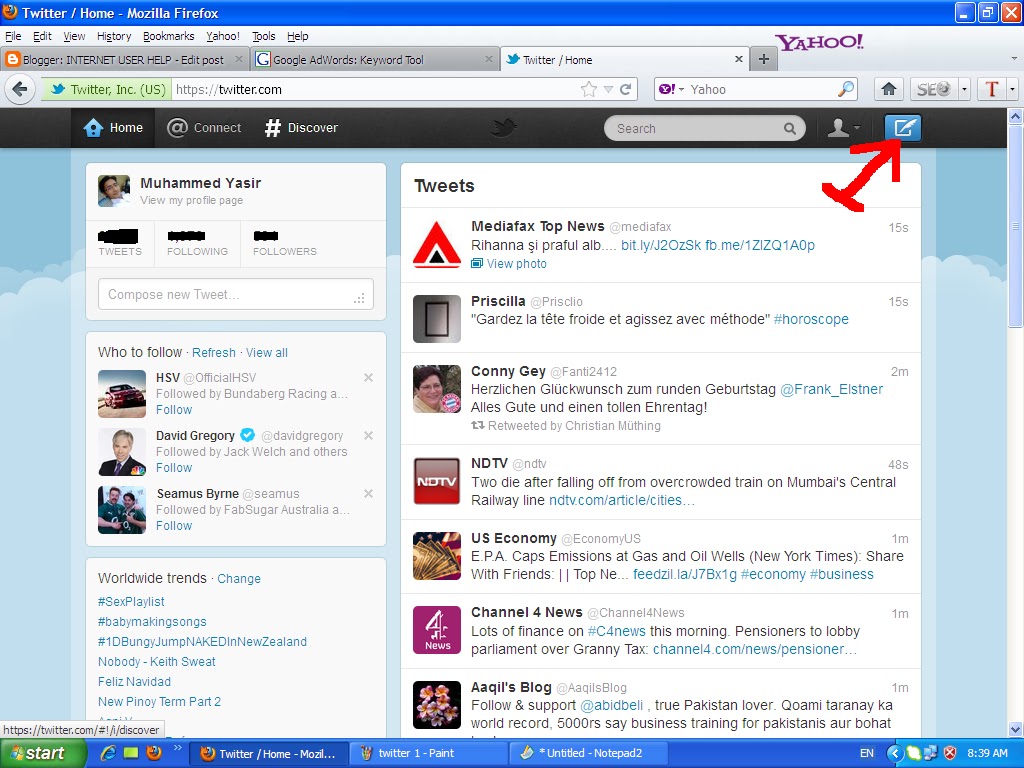
Dear users first of all go to twitter.com after open that you will see following page...  In following page you see the the form where New to Twitter? Sign up with twitter written I also mention this on red line you can see it ... So write your full name and email address after choose your new password or also can choose email password and click on sign up twitter button. After the twitter send to email in your mail Id check your inbox and verify that account and use twitter freely read messages and enjoying it....


Now after reading the above article you will not search "What is twitter".
POST A TWEET ON TWITTER:

Dear User open your twitter account and see the following picture where I mention the button with arrow. So click on this


After click on tweet button you will see that page. So write you message or link who you share or tweet to your followers, fans or friends... And share it or tweet it... See the following pic..

 When friends you click on tweet button your tweet will automatically publish on twitter and your followers and fans can read it.... Check this tweet on following picture....


I hope you will enjoyed it So, keep visit the blog and get free extra knowledge....

Monday, 9 April 2012

BOOKS


THE CATEGORY PORTION IS UNDER CONSTRUCTION:


SOFTWARE AND SERVICES


THE BLOG CATEGORY IS UNDER CONSTRUCTION...


TUTORIALS

THE BLOG CATEGORY IS UNDER CONSTRUCTION

HOW CAN I MAKE A TWITTER ACCOUNT?

MAKE A TWITTER ACCOUNT:

Today in this short post I will tell you how can you make a twitter account.? Friends it is too easy and simple just go to twitter.com. Go to sign up page or create account fill out the form. In username choose your nick name or sure name for your twitter account . Then write your email address and make a strong password, give more information about you that they are need.. When you complete these details then click on the make a account button.. After completing sign up process twitter send you e-mail So first verify your email address go to your e-mail which you war write in twitter signup forms. You see twitter sent mail to you open in and click on verify link to verity your accounts..Add your family member or friends. Remember always add those friends that you are knowing them. For adding those people which are not your friends twitter can suspend your account... So always add friend or follow those people who you are know..

Sunday, 8 April 2012

HOW CAN I MAKE A POST IN BLOG?

MAKE A POST IN BLOG:

If you make a blog and can't know that how can I post in blog.. In this short post tutorial I will tell you making a post in blog. Friend it is very simple, first of all log in your blogger account then you see at your dashboard a orange color button will showing you (A pen picture also showing on this button). So click on this button.. When you click a new page will open.. First write a title of your post on the title box and then write description in description box. Or you can  also insert image.. On the menu bar a picture like button will appear you.. Click on this button and upload image from your computer.. You can also upload image from your picasa album or can put link image from other sites.. You can also  change fonts of the word and it's color.. these two buttons are also in menu toolbar of the post. For insert any video in this blog.. click on the insert video button which are displaying the right side of the insert picture button.. Click on the button and upload video from your computer, or you can also put video from others site..But you need the embed code of the video, when you get the embed code of any video.. put this code into html portion of your post.. This html portion button are displaying left side of the you computer screen.. the two button are one is html ( for html coding) and second is compose (it is for simple text).When you complete all this click on the publish button.. This button is also on same page of post.. This is the simple post making tutorial.. hope you enjoy it..